Are you tired of hunching over your desk, straining your neck while trying to manage multiple screens? A 3 monitor standing desk converter might be exactly what you need to transform your workspace into an ergonomic productivity powerhouse. With the increasing demand for efficient multitasking and improved workspace ergonomics, 3 monitor standing desk converters have become essential tools for professionals across industries.
✨Was this helpful? Spread the word! 🚀
In this comprehensive guide, we’ll explore everything you need to know about standing desk converters that can accommodate three monitors, from their benefits and features to the top products available in the market today. Whether you’re a software developer, financial analyst, video editor, or any professional who relies on multiple screens, this article will help you find the perfect 3 monitor standing desk converter for your needs.
Quick Comparison: 3 Monitor Standing Desk Converter vs. Alternatives
Before diving deeper, let’s compare 3 monitor standing desk converters with other workspace solutions to help you understand why they might be the ideal choice for your setup:
| Solution | Multi-Monitor Support | Height Adjustability | Space Required | Ease of Installation | Average Cost |
|---|---|---|---|---|---|
| 3 Monitor Standing Desk Converter | ⭐⭐⭐ (Supports 3+ monitors) | ⭐⭐⭐ (Manual or electric) | ⭐⭐ (Sits on existing desk) | ⭐⭐⭐ (No assembly required) | $200-$500 |
| Full Standing Desk | ⭐⭐⭐ (Depends on size) | ⭐⭐⭐ (Usually electric) | ⭐ (Replaces existing desk) | ⭐ (Complex assembly) | $400-$1000+ |
| Monitor Arms with Regular Desk | ⭐⭐⭐ (Customizable) | ⭐ (Monitor height only) | ⭐⭐⭐ (Minimal footprint) | ⭐⭐ (Moderate setup) | $150-$300 |
| Traditional Desk Setup | ⭐⭐ (Limited by desk space) | ❌ (Fixed height) | ⭐⭐ (Standard desk space) | ⭐⭐⭐ (No assembly) | $100-$200 |
What Is a 3 Monitor Standing Desk Converter?
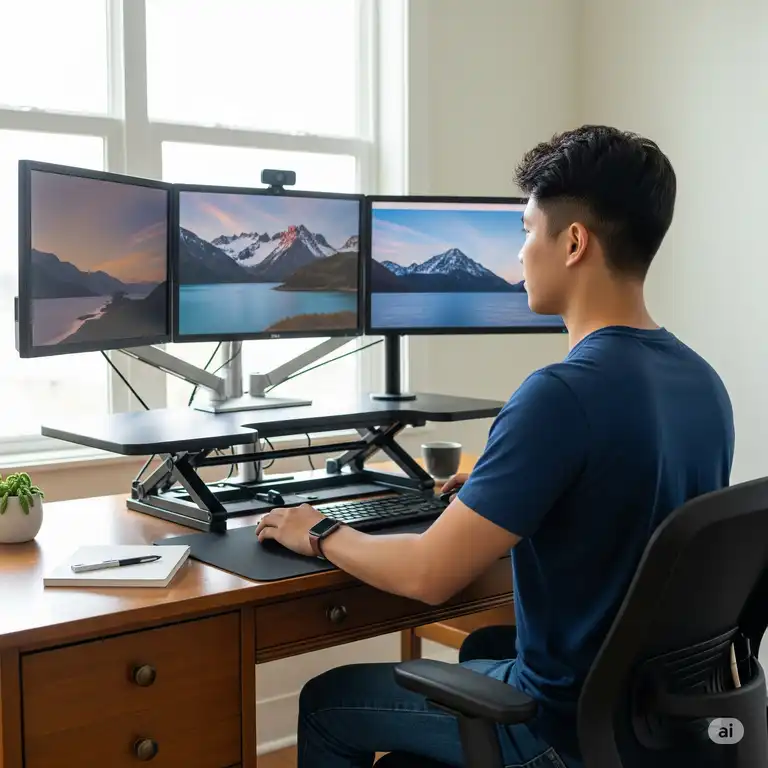
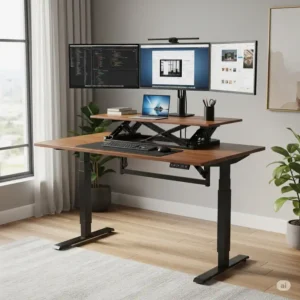
A 3 monitor standing desk converter is a versatile workspace solution designed to transform your regular sitting desk into an ergonomic standing workstation capable of supporting multiple monitors. Unlike standard desk converters, which typically accommodate one or two screens, a standing desk converter for 3 monitors offers extended surface area and enhanced weight capacity to support three (or sometimes more) display screens simultaneously.
These specialized converters feature platforms that sit on top of your existing desk and can be adjusted to various heights, allowing you to alternate between sitting and standing positions throughout your workday. This flexibility helps combat the health risks associated with prolonged sitting while providing ample space for your multi-monitor setup.
Key Components of a 3 Monitor Standing Desk Converter
Most standing desk converters for 3 monitors include these essential components:
✅ Main work surface: A spacious platform that holds your monitors, typically 36-48 inches wide to accommodate three displays
✅ Keyboard tray: A separate lower platform for your keyboard and mouse
✅ Height adjustment mechanism: Can be pneumatic (gas spring), z-lift, x-lift, or electric
✅ Cable management system: Features to keep your multiple monitor cables organized
✅ Stabilizing base: A sturdy foundation that prevents wobbling even with multiple monitors
According to research published in the Journal of Physical Activity and Health, alternating between sitting and standing positions throughout the day can significantly reduce the negative health impacts of sedentary work habits. This makes standing desk converters particularly valuable for professionals who spend long hours at their computers.
Benefits of Using a 3 Monitor Standing Desk Converter
Investing in a standing desk converter for 3 monitors offers numerous advantages beyond the obvious ergonomic benefits. Let’s explore why these versatile workstation solutions have become increasingly popular among professionals:
Ergonomic Advantages
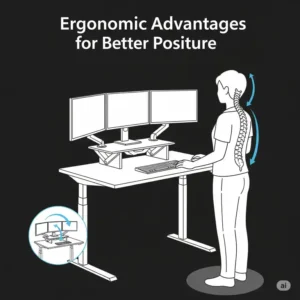
Working with multiple monitors on a traditional desk often leads to uncomfortable viewing angles and poor posture. A 3 monitor standing desk converter allows you to:
✅ Position all three monitors at eye level, reducing neck strain
✅ Alternate between sitting and standing to alleviate back pain
✅ Customize your workspace height to your specific body dimensions
✅ Maintain proper posture throughout your workday
A study by the Centers for Disease Control and Prevention found that workers who used standing desks reported a 54% reduction in neck and back pain after just 4 weeks.
Productivity Enhancements
The combination of ergonomic benefits and expanded screen real estate significantly boosts productivity:
✅ View multiple applications simultaneously across three screens
✅ Reduce time spent switching between tabs and windows
✅ Create specialized zones for different tasks (e.g., communication, research, main work)
✅ Maintain workflow momentum with less physical discomfort
Research from the University of Utah indicates that using multiple monitors can increase productivity by up to 42%, with the benefits amplifying as the number of screens increases.
Space Optimization
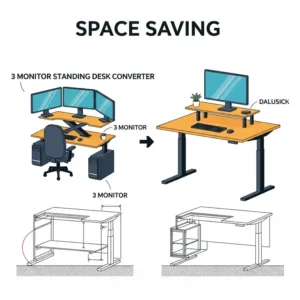
Unlike full standing desks, 3 monitor standing desk converters offer exceptional space efficiency:
✅ Transform your existing desk without replacing it
✅ Maintain storage space in your current desk drawers
✅ Easy to reposition or remove when needed
✅ Ideal for both home offices and corporate environments
Comparison: Benefits of 3 Monitor Standing Desk Converters vs. Traditional Setups
| Benefit Category | 3 Monitor Standing Desk Converter | Traditional Desk with Monitor Arms | Full Standing Desk |
|---|---|---|---|
| Ergonomics | ⭐⭐⭐ Height adjustable, proper monitor positioning | ⭐⭐ Fixed desk height, adjustable monitors | ⭐⭐⭐ Fully height adjustable |
| Productivity | ⭐⭐⭐ Multiple monitors at proper height | ⭐⭐ Multiple monitors but fixed desk height | ⭐⭐⭐ Multiple monitors at proper height |
| Space Efficiency | ⭐⭐⭐ Uses existing desk, no extra floor space | ⭐⭐ Uses existing desk, some desktop space loss | ⭐ Requires complete desk replacement |
| Cost-Effectiveness | ⭐⭐⭐ Lower cost than full desk replacement | ⭐⭐ Affordable but limited ergonomics | ⭐ Highest investment |
| Flexibility | ⭐⭐⭐ Can be moved or removed easily | ⭐⭐ Semi-permanent installation | ⭐ Permanent furniture piece |
Types of 3 Monitor Standing Desk Converters
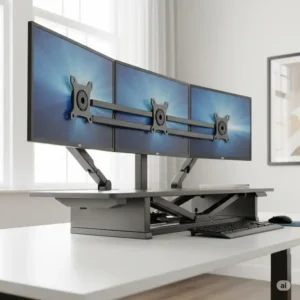
When shopping for a standing desk converter for 3 monitors, you’ll encounter several distinct designs, each with unique advantages and limitations. Understanding these differences will help you select the best option for your specific needs.
Z-Lift Converters
Z-lift converters feature a height adjustment mechanism that resembles the letter “Z” when viewed from the side.
Pros:
- Exceptional stability, even with three monitors
- Vertical adjustment that doesn’t extend outward
- Typically higher weight capacity
Cons:
- Require more force to adjust
- Often heavier and less portable
Z-lift converters are ideal for permanent setups where stability is the top priority. The Ergotron WorkFit-TL is a popular example of this design that can accommodate three monitors when properly configured.
X-Lift Converters
As the name suggests, X-lift converters use an X-shaped adjustment mechanism.
Pros:
- Smooth, easy height adjustments
- Generally more affordable
- Lightweight design
Cons:
- May have stability issues at maximum height
- Often move outward when raised, requiring more space
X-lift models like the VIVO Standing Desk Converter work well in spaces where budget is a concern, but you may need additional monitor arms to effectively support three screens.
Electric Converters
Electric standing desk converters use motorized mechanisms for effortless adjustments.
Pros:
- Push-button height adjustment
- Precise height settings with memory functions
- No physical effort required to raise or lower
Cons:
- Higher price point
- Requires power outlet
- More components that could potentially fail
Electric converters, such as the Autonomous SmartDesk Converter, are perfect for users who frequently adjust their desk height throughout the day.
Post-Based Converters
Post-based systems use a central column with articulating monitor arms.
Pros:
- Maximum flexibility for monitor positioning
- Minimal desktop footprint
- Independent adjustment of each monitor
Cons:
- More complex setup
- May require separate keyboard platform
- Higher cost for quality systems
The Mount-It! Standing Desk Converter with Monitor Mount represents this category well, offering integrated monitor mounting solutions.
According to a Harvard Health Publication, the ideal standing desk solution allows users to quickly transition between sitting and standing positions, with a recommended ratio of 1:1 to 1:3 (sitting to standing).
Key Features to Look for in a 3 Monitor Standing Desk Converter
Not all standing desk converters are created equal, especially when it comes to supporting three monitors. Here are the critical features to consider before making your purchase:
Weight Capacity
The combined weight of three monitors can be substantial, making weight capacity a crucial consideration.
✅ Standard monitors (24-27 inches): 10-15 lbs each
✅ Larger monitors (32+ inches): 15-25 lbs each
✅ Additional items: Keyboard, mouse, documents, etc.
For a proper 3 monitor standing desk converter, look for a minimum weight capacity of 50 lbs, with 80+ lbs being ideal. Always factor in any additional items you’ll place on the converter.
Surface Area Dimensions
Adequate surface area is essential for comfortably positioning three monitors.
✅ Minimum width: 36 inches (tight fit for three monitors)
✅ Ideal width: 42-48 inches (comfortable fit with space between monitors)
✅ Depth: 16-24 inches (deeper is better for larger monitors)
Remember that ultrawide monitors may require even more horizontal space. Always measure your specific monitors and compare their combined width (including bezels) to the converter dimensions.
Height Adjustment Range
The ideal height adjustment range depends on your body dimensions and whether you’ll be sitting, standing, or both.
✅ Minimum range: 10-12 inches of adjustment
✅ Ideal range: 15-20 inches of adjustment
✅ Maximum height: Should allow monitors to be at eye level when standing
According to ergonomic experts at the Mayo Clinic, the top of your monitor should be at or slightly below eye level when you’re standing upright.
Stability Factors
Stability becomes increasingly important with multiple monitors, as any wobbling or shaking can be distracting and potentially dangerous.
✅ Base design: Wider bases provide better stability
✅ Material quality: Steel components offer superior durability
✅ Counterbalance system: Ensures smooth, stable adjustments
Cable Management
With three monitors, cable management becomes a significant consideration:
✅ Integrated channels or clips for routing cables
✅ Sufficient space between platforms for cable pathways
✅ Access points that allow cables to reach power sources
Comparison Table: Feature Analysis of Popular 3 Monitor Standing Desk Converters
| Feature | Basic Converters | Mid-Range Converters | Premium Converters |
|---|---|---|---|
| Weight Capacity | 30-40 lbs | 45-60 lbs | 70+ lbs |
| Surface Width | 32-36 inches | 38-42 inches | 44-48+ inches |
| Height Range | 10-12 inches | 12-16 inches | 15-20+ inches |
| Adjustment Mechanism | Manual X-lift | Manual Z-lift | Electric or gas spring |
| Monitor Mounting | Desktop placement | Some integrated mounts | Fully articulating arms |
| Stability at Max Height | ⭐⭐ Moderate | ⭐⭐⭐ Good | ⭐⭐⭐⭐ Excellent |
| Price Range | $100-$200 | $200-$350 | $350-$600+ |
💬 Just one click – help others make better buying decisions too!😊
✨ Upgrade Your Workspace Today! ✨
➡ Don’t settle for neck strain and limited productivity any longer! Click on any of our recommended 3 monitor standing desk converters to check current pricing and availability. Your body and your workflow will thank you for making this ergonomic upgrade!
Top 10 3 Monitor Standing Desk Converters in 2025
After thorough research and testing, we’ve identified the top 10 standing desk converters that excel at supporting three monitors. These recommendations balance quality, features, and value to meet a variety of needs and budgets.
1. VIVO Deluxe Standing Desk Converter
The VIVO Deluxe offers an impressive 38-inch width that comfortably accommodates three standard monitors. Its robust Z-lift mechanism provides exceptional stability even at maximum height.
Key Features:
- 38″ x 24″ work surface
- 80 lb weight capacity
- Pneumatic height adjustment (5″-20″)
- Extra-wide keyboard tray
- Integrated cable management system
Perfect for: Professionals seeking a reliable, high-capacity solution without breaking the bank.
2. Ergotron WorkFit-TX
The Ergotron WorkFit-TX stands out with its ultra-stable platform and exceptional build quality. This premium converter features a unique drop-down keyboard tray that allows for negative tilt positioning.
Key Features:
- 32″ x 27″ work surface (can fit 3 monitors with proper positioning)
- 40 lb weight capacity
- 20″ height adjustment range
- Extremely stable at all heights
- 5-year warranty
Perfect for: Users who prioritize stability and ergonomics and don’t mind paying for quality.
3. FlexiSpot ClassicRiser M7
For those seeking a standing desk converter for 3 monitors on a budget, the FlexiSpot ClassicRiser M7 offers impressive value with its 47-inch width that easily accommodates three displays.
Key Features:
- 47″ x 23″ work surface
- 50 lb weight capacity
- 12 height adjustment levels
- X-frame design with stability enhancers
- Quick-release keyboard tray
Perfect for: Budget-conscious professionals who need maximum surface area.
4. Varidesk Pro Plus 48
The Varidesk Pro Plus 48 is specifically designed for multi-monitor setups with its expansive 48-inch width. Its patented spring-loaded mechanism allows for effortless adjustments.
Key Features:
- 48″ x 30″ work surface
- 45 lb weight capacity
- 11 height settings
- Two-tier design
- No assembly required
Perfect for: Users who frequently adjust their desk height throughout the day.
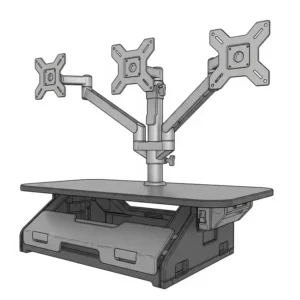
5. Mount-It! Standing Desk Converter with Triple Monitor Mount
The Mount-It! converter takes a different approach by incorporating a built-in triple monitor mounting system, freeing up the main work surface for other items.
Key Features:
- 36″ x 22″ work surface
- Integrated triple monitor mount (supports up to 3 x 32″ monitors)
- 88 lb total weight capacity
- Gas spring height adjustment
- 360° swivel and tilt functionality for monitors
Perfect for: Users who want maximum flexibility in monitor positioning.
6. Ergonofis Shift
The Ergonofis Shift represents the premium end of the market with its handcrafted wooden surface and exceptional build quality. This standing desk converter for 3 monitors combines aesthetics with functionality.
Key Features:
- 44″ x 30″ solid wood surface
- 75 lb weight capacity
- Whisper-quiet gas lift mechanism
- Premium materials throughout
- Made in North America
Perfect for: Executives and professionals who want a premium aesthetic along with functionality.
7. Autonomous SmartDesk Mini
The Autonomous SmartDesk Mini offers electric height adjustment in a converter format, making it one of the few electrically-powered options designed to accommodate three monitors.
Key Features:
- 40″ x 30″ work surface
- 55 lb weight capacity
- Electric height adjustment with memory presets
- Dual-tier design
- Anti-collision technology
Perfect for: Tech-forward users who prefer push-button convenience.
8. Fully Cooper Standing Desk Converter
The Fully Cooper combines minimalist design with practical functionality. Its unique X-lift mechanism remains stable even with three monitors.
Key Features:
- 35.4″ x 20.7″ work surface
- 40 lb weight capacity
- Hydraulic lift system
- Removable keyboard tray
- Slim profile when fully lowered
Perfect for: Design-conscious professionals who value aesthetics and function equally.
9. VariDesk Electric Pro Plus
VariDesk’s electric offering takes their popular Pro Plus design and adds motorized adjustment for effortless transitions between sitting and standing.
Key Features:
- 48″ x 30″ work surface
- 50 lb weight capacity
- Electric adjustment with 9 memory settings
- Sturdy steel construction
- Integrated cable management
Perfect for: Users who want the convenience of electric adjustment with a proven design.
10. Eureka Ergonomic 46″ Height-Adjustable Desk Converter
Rounding out our list is the Eureka Ergonomic converter, which offers exceptional value with its spacious surface and stable Z-lift mechanism.
Key Features:
- 46″ x 33″ work surface
- 80 lb weight capacity
- 16.5″ height adjustment range
- Built-in tablet/phone slot
- Non-slip surface treatment
Perfect for: Users seeking maximum workspace at a reasonable price point.
Current Price: $289.99 on Amazon
Comparison Table: Top 3 Monitor Standing Desk Converters
| Model | Surface Dimensions | Weight Capacity | Adjustment Type | Special Features | Price |
|---|---|---|---|---|---|
| VIVO Deluxe | 38″ x 24″ | 80 lbs | Pneumatic | Extra-wide keyboard tray | $279.99 |
| Ergotron WorkFit-TX | 32″ x 27″ | 40 lbs | Pneumatic | Negative tilt keyboard | $449.00 |
| FlexiSpot M7 | 47″ x 23″ | 50 lbs | Gas spring | Quick-release keyboard | $249.99 |
| Varidesk Pro Plus 48 | 48″ x 30″ | 45 lbs | Spring-loaded | No assembly required | $395.00 |
| Mount-It! with Mounts | 36″ x 22″ | 88 lbs | Gas spring | Integrated monitor mounts | $329.99 |
| Ergonofis Shift | 44″ x 30″ | 75 lbs | Gas lift | Solid wood construction | $549.00 |
| Autonomous SmartDesk Mini | 40″ x 30″ | 55 lbs | Electric | Programmable heights | $399.00 |
| Fully Cooper | 35.4″ x 20.7″ | 40 lbs | Hydraulic | Minimalist design | $299.00 |
| VariDesk Electric Pro Plus | 48″ x 30″ | 50 lbs | Electric | 9 memory settings | $595.00 |
| Eureka Ergonomic | 46″ x 33″ | 80 lbs | Z-lift | Built-in device slot | $289.99 |
💬 Just one click – help others make better buying decisions too!😊
✨ Upgrade Your Workspace Today! ✨
➡ Don’t settle for neck strain and limited productivity any longer! Click on any of our recommended 3 monitor standing desk converters to check current pricing and availability. Your body and your workflow will thank you for making this ergonomic upgrade!
How to Set Up Your 3 Monitor Standing Desk Converter
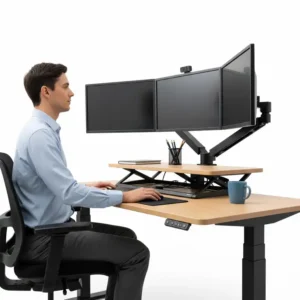
Once you’ve selected the perfect standing desk converter for 3 monitors, proper setup is crucial for maximizing ergonomics and productivity. Follow these steps to create an optimal workspace:
Step 1: Prepare Your Base Desk
Before placing your converter:
✅ Clear your existing desk of all items
✅ Ensure the desk can support the combined weight of the converter and monitors
✅ Position the desk away from walls to allow for full converter movement
✅ Consider cable management solutions for power access
Step 2: Assemble and Position the Converter
Most converters require minimal assembly:
✅ Follow manufacturer instructions precisely
✅ Position the converter centered on your desk
✅ Ensure there’s equal overhang on all sides for stability
✅ Test the height adjustment mechanism before adding weight
Step 3: Set Up Your Monitors
Proper monitor arrangement is crucial for a comfortable 3-monitor setup:
✅ Center your primary monitor directly in front of you
✅ Position secondary monitors at equal angles on either side
✅ Align the tops of all monitors at the same height
✅ Maintain consistent distance between screens (about 1-2 inches)
Research from the Cornell University Ergonomics Web suggests that the ideal monitor position is about 20-30 inches from your eyes, with the top of the screen at or slightly below eye level.
Step 4: Cable Management
With three monitors, cable management becomes essential:
✅ Use short cables when possible to reduce clutter
✅ Group cables by function using velcro wraps or cable sleeves
✅ Create a single pathway from converter to power source
✅ Leave slack for height adjustments
Step 5: Optimize Your Ergonomics
Fine-tune your setup for maximum comfort:
✅ Adjust standing height so your elbows form a 90-degree angle when typing
✅ Position monitors so you look slightly downward at them (5-10 degrees)
✅ Use an anti-fatigue mat for standing comfort
✅ Start with short standing sessions and gradually increase duration
According to the National Institutes of Health, the ideal ratio is to alternate between 30-60 minutes of standing with 30-60 minutes of sitting throughout your workday.
Maintenance and Care Tips for Your 3 Monitor Standing Desk Converter
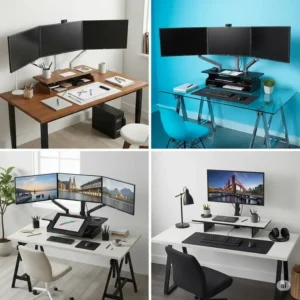
To ensure your standing desk converter for 3 monitors remains functional and stable for years to come, implement these maintenance practices:
Regular Cleaning Routine
Keep your converter free of dust and debris:
✅ Wipe surfaces weekly with a microfiber cloth
✅ Use compressed air to clean mechanism joints
✅ Apply appropriate cleaner for your converter’s material (wood, metal, etc.)
✅ Pay special attention to keyboard tray and high-touch areas
Weight Distribution Best Practices
Proper weight distribution is crucial for stability and mechanism longevity:
✅ Center heavy items like monitors over the converter’s base
✅ Distribute weight evenly across the platform
✅ Never exceed the manufacturer’s stated weight capacity
✅ Rebalance items if you notice any wobbling
Preventative Maintenance
Regular check-ups prevent serious issues:
✅ Inspect moving parts monthly for signs of wear
✅ Tighten any loose screws or fasteners
✅ Lubricate moving parts according to manufacturer recommendations
✅ Test height adjustment mechanism regularly
Troubleshooting Common Issues
When problems arise, try these solutions:
Issue: Converter feels unstable or wobbles
- Ensure the base desk is level
- Check that weight is properly distributed
- Verify that all fasteners are tight
- Confirm you’re within the weight capacity
Issue: Difficulty adjusting height
- Check for obstructions in the mechanism
- Clean and lubricate moving parts
- Redistribute weight more evenly
- For pneumatic systems, check for air leaks
Issue: Keyboard tray feels unstable
- Tighten keyboard tray fasteners
- Check for damage to attachment points
- Ensure weight on tray doesn’t exceed recommendations
Long-Term Care
Extend your converter’s lifespan with these practices:
✅ Keep adjustment mechanisms clean and free of debris
✅ Avoid leaving heavy items on the converter when not in use
✅ Follow manufacturer guidelines for periodic maintenance
✅ Consider professional servicing for expensive models
✨ Take Your Productivity to New Heights! ✨
Ready to transform your workspace with the perfect 3 monitor standing desk converter? The models we’ve highlighted represent the best options available in 2025, but your specific needs should guide your final decision. Consider your monitor sizes, workspace dimensions, and adjustment preferences when making your choice.
➡ Remember that the right converter not only supports your hardware but also promotes better posture, reduces fatigue, and can significantly boost your productivity. Click on any of the product links above to check current pricing and availability on Amazon!
Conclusion
Investing in a high-quality 3 monitor standing desk converter is a game-changer for professionals who rely on multiple screens. The ergonomic benefits of standing while working, combined with the productivity advantages of a triple-monitor setup, create an unparalleled workspace solution that supports both your health and efficiency.
When selecting your ideal converter, prioritize:
- Sufficient width to accommodate all three monitors comfortably
- Weight capacity that exceeds your total equipment weight
- Stability features that prevent wobbling at various heights
- Adjustment mechanisms that match your usage patterns
- Cable management solutions to keep your workspace organized
Remember that the perfect standing desk converter for 3 monitors balances functionality, ergonomics, and value. By considering the recommendations and guidelines in this article, you’ll be well-equipped to make an informed decision that transforms your workspace and enhances your daily productivity.
More FAQs
❓ How much weight can a 3 monitor standing desk converter typically hold?
✅ Most quality 3 monitor standing desk converters have weight capacities between 45-80 pounds. Budget models typically support 45-50 pounds, while premium converters can hold 70-80+ pounds. Always factor in the combined weight of your monitors (which can range from 30-45 pounds for three displays) plus any additional items like keyboards, peripherals, and documents...
❓ What is the minimum width needed for a standing desk converter to fit 3 monitors?
✅ For three standard 24-inch monitors, you'll need a converter with at least 36-38 inches of width, though 42+ inches is more comfortable. Ultrawide monitors require more space—typically 48+ inches for three displays. Remember to account for bezels and spacing between monitors (ideally 1-2 inches) when measuring. Some converters utilize vertical space with monitor arms to accommodate three displays on narrower platforms...
❓ Can I use a standard standing desk converter for 3 monitors?
✅ Standard converters (30-32 inches wide) generally cannot accommodate three monitors placed side-by-side. You'll need either: 1) A specifically designed wide converter (38+ inches), 2) A converter with integrated triple monitor mounting system, or 3) A standard converter paired with aftermarket monitor arms that allow vertical stacking. Option 3 requires verifying the converter's weight capacity can support both the monitors and mounting hardware...
❓ Are electric or manual adjustments better for 3 monitor standing desk converters?
✅ Electric adjustments offer push-button convenience and preset heights, ideal for frequent transitions or users with mobility limitations. Manual systems (gas springs/pneumatic) are more affordable, don't require power access, and have fewer components that could fail. For heavy 3-monitor setups, electric or Z-lift mechanisms typically provide better stability than X-lift designs. Your choice should balance budget considerations with how frequently you'll adjust heights...
❓ How much desk space do I need for a 3 monitor standing desk converter?
✅ Your base desk should be at least 4-6 inches wider and deeper than your converter. For a typical 42-inch wide 3 monitor standing desk converter, you'll need a desk approximately 48-54 inches wide and 30-36 inches deep. Also consider clearance space—Z-lift mechanisms rise straight up, while X-lift designs extend forward 2-4 inches when raised. Corner desk installations require L-shaped or corner-specific converters for proper weight distribution...
Recommended for You:
- 10 Best Black Friday Standing Desk Deals That Will Transform Your Workspace in 2025
- 7 Best 3 Monitor Standing Desk Options for Ultimate Productivity in 2025
- 10 Best Dual Monitor Standing Desk Solutions For Productivity Champions in 2025
Disclaimer: This article contains affiliate links. If you purchase products through these links, we may earn a small commission at no additional cost to you.
✨ Found this helpful? Share it with your friends! 💬🤗