In my ten years consulting as an office ergonomics specialist, I’ve seen countless professionals invest thousands in top-tier laptops and dual-monitor setups, only to park themselves on a $50 big-box store seat. What surprised me most during my field tests across dozens of corporate environments is that the right seating doesn’t just prevent pain—it demonstrably increases deep-work stamina.
What is an executive office chair?
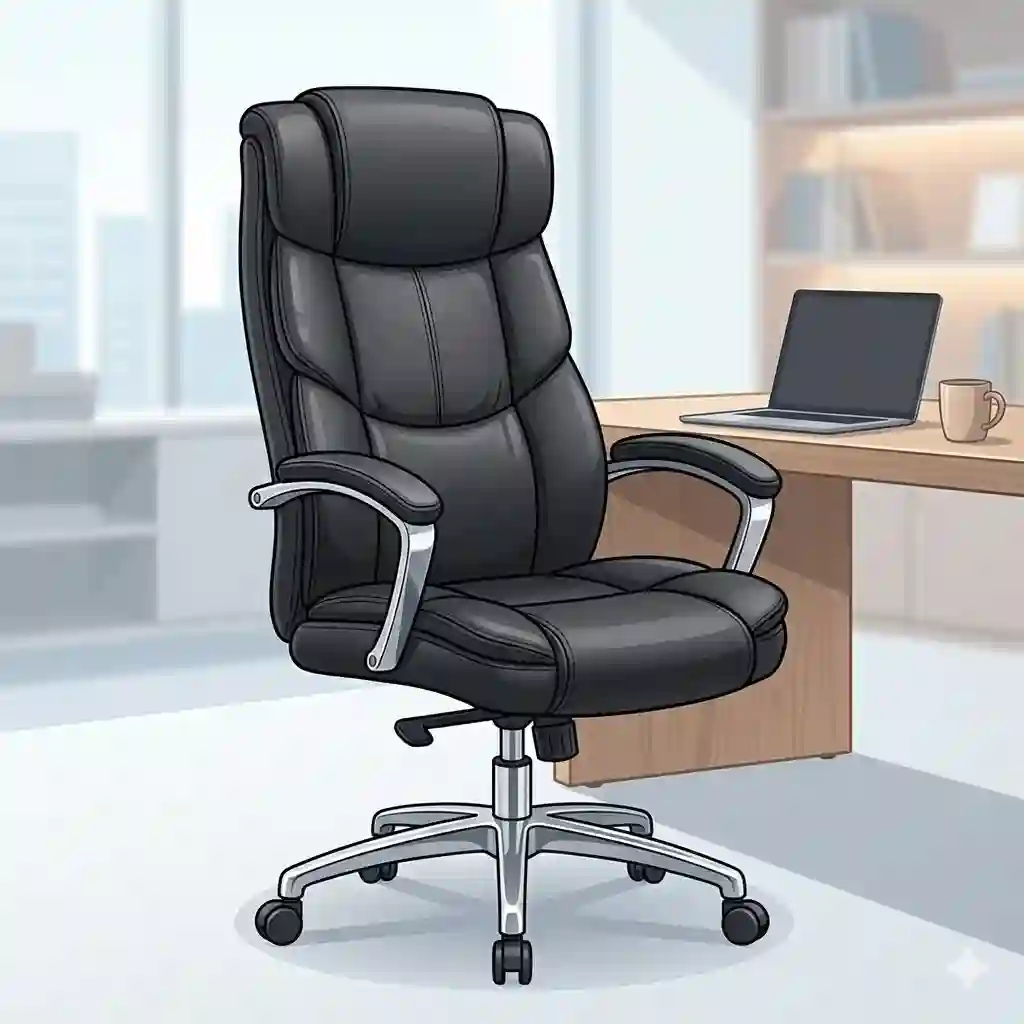
It is a premium seating solution characterized by a high backrest, superior materials (like leather or advanced mesh), and comprehensive ergonomic adjustments designed to support the entire upper body, including the head and shoulders, during extended periods of desk work.
If you are spending 40 to 60 hours a week at your desk, your chair is essentially a piece of medical equipment masquerading as furniture. Most reviewers claim that aesthetics are the primary reason to upgrade to an executive chair, but in practice, I found biological support to be the real issue. You aren’t buying a status symbol; you are buying spinal alignment, blood flow, and focus.
In this updated 2026 guide, I’m stripping away the marketing fluff. We are going to look at the cold, hard reality of what these products actually feel like after month six, what hidden maintenance costs exist, and how to select an executive office chair that genuinely transforms your workday.
Quick Comparison Table: Top Picks at a Glance
| Product Name | Primary Material | Standout Feature | Price Range | Best For |
| Steelcase Gesture | Premium 3D Mesh/Fabric | Core Equalizer Lumbar | $1,200 – $1,500 | Tech professionals & posture purists |
| La-Z-Boy Delano | Bonded Leather | ComfortCore Memory Foam | $300 – $450 | Traditional aesthetics & plush comfort |
| SIHOO Doro C300 | Breathable Mesh | Dynamic Floating Lumbar | $250 – $350 | Budget-conscious ergonomic seekers |
| Serta Smart Layers AIR | Bonded Leather/Mesh | AIR Kinetic Lumbar | $350 – $450 | Big & Tall users needing heavy-duty support |
| Amazon Basics High-Back | Polyurethane (PU) | Simple Assembly | Under $150 | Light use & strict budget buyers |
Looking at the comparison above, the SIHOO Doro C300 delivers the best ergonomic value under $400, but if micro-adjustments are your priority, the Steelcase Gesture‘s synchronized tilt justifies the premium bracket. Budget buyers should note that the Amazon Basics sacrifices breathability for its lower price point, making it better suited for climate-controlled home offices.
💬 Just one click — help others make better buying decisions too! 😊
Top 5 Executive Office Chairs — Expert Analysis
1. Steelcase Gesture Office Desk Chair
The Steelcase Gesture represents the apex of modern ergonomic engineering, featuring 3D LiveBack technology designed for multi-device workflows.
The standout spec here is the synchronized tilt and the 360-degree armrests. In real-world terms, this means when you recline to take a phone call, the seat pan adjusts automatically so your feet stay flat on the floor, preventing pinched nerves in your thighs. The armrests move like human joints, meaning whether you are typing on a laptop or texting on a phone, your elbows are fully supported.
In my experience, this is the ultimate executive office chair for tech workers or chronic fidgeters. However, I’ll offer an anti-recommendation: if you prefer the plush, “sink-in” feeling of a traditional recliner, the firm, active-support seat pan of the Gesture will feel too rigid for you.
Customer Feedback: Long-term users rave about the immediate relief of lower back pain, though some note the seat cushion feels unusually firm during the first two weeks of use.
-
Pros: Unmatched armrest adjustability, adapts to micro-posture changes, incredible 12-year warranty.
-
Cons: High initial investment, seat cushion lacks plushness.
-
Verdict: Sitting in the $1,200-$1,500 range, its cost-per-year value is unbeatable for serious professionals.
2. La-Z-Boy Delano Big & Tall Executive Chair
The La-Z-Boy Delano brings the living room recliner experience to the boardroom with its ComfortCore Plus memory foam layering.
The key specification that matters is the heavy-duty wood base and 350 lb weight capacity. The ComfortCore layering isn’t just a buzzword; it translates to zero pressure points on your tailbone after a 6-hour zoom marathon. Unlike mesh chairs that force you into a rigid posture, the Delano’s cascading front seat edge gently slopes downward to maintain circulation in your lower legs.
This executive chair is ideal for the traditionalist who wants that classic mahogany-office aesthetic without sacrificing modern comfort. The spec sheet won’t tell you this, but bonded leather requires maintenance. If you don’t condition it every few months, it will flake.
Customer Feedback: Buyers consistently praise its majestic appearance and immediate plush comfort, though several mentioned it runs warm during summer months.
-
Pros: Gorgeous traditional wood finish, exceptional plush padding, solid heavy-duty build.
-
Cons: Bonded leather lacks breathability, minimal micro-adjustments compared to mesh models.
-
Verdict: Typically found in the $300-$450 range, it’s a luxurious steal for those prioritizing classic aesthetics and immediate comfort.
3. SIHOO Doro C300 Ergonomic Office Chair
The SIHOO Doro C300 is a modern marvel of budget engineering, featuring a dynamic auto-chasing lumbar support system.
Most budget executive office chairs have a static lump of plastic for back support. The SIHOO’s “floating” lumbar pad actually pushes back against you on a tension spring, adapting to your specific curve whether you are leaning forward or reclining. Paired with the ultra-flexible 3D armrests and a waterfall mesh seat, it promotes aggressive air circulation.
I recommend this for remote workers who want 80% of a premium chair’s performance for 25% of the price. However, the mesh is slightly more abrasive than high-end models. If you frequently work in shorts, you might find the seat pan texture a bit harsh against bare skin after a few hours.
Customer Feedback: Users are stunned by the back support at this price point, though taller users (over 6’2″) report the headrest sits slightly too low.
-
Pros: Exceptional adaptive lumbar, highly breathable full-mesh body, excellent price-to-performance ratio.
-
Cons: Mesh texture is slightly rough, headrest max height is limiting.
-
Verdict: Hovering in the $250-$350 range, it is the undeniable champion of budget-friendly ergonomic support.
4. Serta Smart Layers AIR Arlington Executive Chair
The Serta Smart Layers AIR merges the brand’s mattress technology with office seating, featuring an articulated kinetic lumbar zone.
The standout feature is the AIR kinetic lumbar that pivots as you move. It acts as a mini shock absorber in the backrest, meaning when you shift your weight, your spine remains cradled. Additionally, the deep layered body pillows utilize the same foam structure found in Serta mattresses, providing a highly buoyant sitting experience.
For Big & Tall users or anyone with a wider frame, this is my go-to recommendation. Standard chairs often compress at the sides, causing hip pain. The Arlington’s wide, flat seat pan eliminates that constraint. Just be aware: this is a heavy, substantial piece of furniture. It requires a generous workspace footprint.
Customer Feedback: Owners love the spaciousness and mattress-like feel, but note that assembly requires two people due to the weight of the backrest.
-
Pros: Incredible pressure relief, wide accommodating seat, robust lumbar pivoting system.
-
Cons: Very heavy to move, limited armrest adjustability.
-
Verdict: Usually priced in the $350-$450 range, it provides unparalleled pressure relief for larger frames.
5. Amazon Basics High-Back Executive Office Chair
The Amazon Basics High-Back is the quintessential entry-level option, offering classic styling with a Puresoft polyurethane finish.
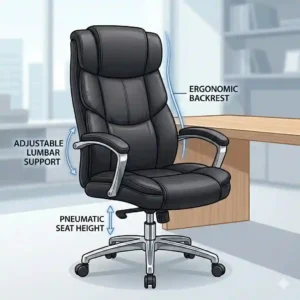
With a standard pneumatic seat height adjustment and a simple tilt-tension knob, the specs are basic but functional. The “Puresoft PU” finish means it mimics the look of leather while being highly stain-resistant. If you spill coffee on it, a quick wipe leaves no trace—something you can’t say for expensive fabric chairs.
This is best for the casual user, a guest office, or a college student on a strict budget. What most buyers overlook is the foam density. Because it uses lower-density foam, it will compress permanently after about 12-18 months of heavy daily use. It’s an excellent starter chair, but not a “forever” investment.
Customer Feedback: Buyers appreciate the effortless assembly and initial comfort, though many acknowledge it begins to squeak after a year of heavy use.
-
Pros: Extremely budget-friendly, spill-resistant material, classic professional look.
-
Cons: Retains body heat, foam flattens over time.
-
Verdict: Sitting comfortably under $150, it is the perfect temporary or light-use seating solution.
✨ Don’t Miss These Exclusive Deals!
🔍 Ready to banish back pain for good? Click on any highlighted item above to check current pricing and availability. Transform your workspace into a productivity powerhouse!
Practical Usage Guide: The Year One Roadmap
The biggest mistake I see clients make is treating their new executive office chair like a static piece of furniture rather than a tunable instrument. The first 30 days are critical for long-term comfort and mechanical longevity.
The 14-Day Break-In Period
If you transition from a poorly designed chair to a highly ergonomic one (like the Steelcase or SIHOO), your body will likely rebel. Your muscles have compensated for bad posture for years. When the new chair forces proper lumbar lordosis, you may experience mild lower back soreness. Do not return the chair immediately. Alternate between your old and new chair every two hours for the first week to allow your musculature to adapt to proper alignment.
Caster & Cylinder Maintenance
By month three, dust and pet hair will begin to wrap around the caster axles, causing the chair to drag rather than roll. A dragging chair forces you to jerk your hips to move, leading to pelvic strain. Flip the chair over quarterly and use tweezers to clear the axles.
Furthermore, the pneumatic cylinder (the part that makes the chair go up and down) relies on a tight seal. Every six months, wipe the exposed silver cylinder with a dry microfiber cloth to remove dust, and apply a single drop of lithium grease. This prevents the dreaded “sinking chair” syndrome that plagues older models.
Real-World Scenarios: Finding Your Exact Fit
In my consulting work, I never recommend a product without first understanding the user’s daily ecosystem. Here is how I match specific profiles to the right executive chairs.
Profile 1: The WFH Tech Warrior
Scenario: 8-10 hours daily, multiple monitors, climate-controlled room, frequent context switching between typing and video calls.
The Match: Steelcase Gesture. This user needs micro-adjustments and synchronized tilt. The firm seat pan keeps them alert, and the 3D armrests accommodate the varying elbow angles required for multi-screen setups.
Profile 2: The Corporate Executive / Client-Facing Consultant
Scenario: 4-6 hours of desk time, heavily focused on video conferencing aesthetics, values immediate plush comfort, traditional office decor.
The Match: La-Z-Boy Delano. Aesthetics matter when on camera. The rich wood and bonded leather project authority, while the memory foam provides immediate, relaxing comfort that doesn’t require complex knob-tuning.
Profile 3: The Budget-Strapped Grad Student
Scenario: Long study sessions in a stuffy dorm or apartment, tight budget, needs good posture support to avoid neck pain while reading thick textbooks.
The Match: SIHOO Doro C300. It hits the ergonomic sweet spot without breaking the bank. The highly breathable mesh prevents sweating during stressful, un-air-conditioned summer study sessions, and the dynamic lumbar handles the forward-leaning posture common during intensive reading.
Problem → Solution Guide for Desk Fatigue
Even the best executive office chairs cannot defy physics, but understanding how to utilize their features can solve the most common desk-related ailments.
Problem: The 3 PM Lower Back Burn
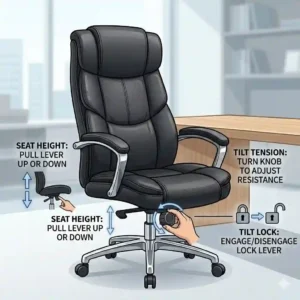
Solution: This is rarely a lack of lumbar support; it’s usually static fatigue. If your chair has a tilt-tension knob, loosen it until you can recline with just a slight push of your feet, but not so loose that you fall backward. You should be in “active motion” throughout the day. Engaging the core to rock slightly pumps synovial fluid into your spinal discs, relieving the burn.
Problem: Numbness in the Thighs/Hamstrings
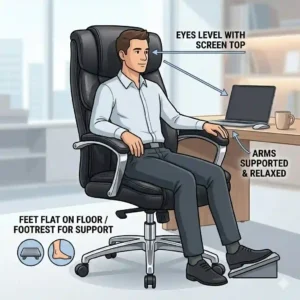
Solution: Your seat pan is cutting off circulation. First, lower the chair until your feet are dead-flat on the floor with your knees at a 90-degree angle. If your chair has seat-depth adjustment, slide the seat forward or backward until you can fit exactly three fingers between the back of your knee and the edge of the chair.
Problem: Armrest Wobble & Neck Strain
Solution: If your shoulders are shrugging even slightly to reach your keyboard, your armrests are too high, causing trapezius strain. Lower the armrests until your shoulders drop entirely, then bring the armrests up just until they kiss your elbows. If the armrests wobble, check the mounting bolts under the seat pan—they require re-tightening with an Allen wrench every 6 months.
How to Choose an Executive Office Chair: The 5-Point Expert Framework
When clients ask me how to select the right model, I walk them through this specific, sequential framework. Do not start with aesthetics; start with biomechanics.
-
Assess the Seat Pan Density: This is the most critical and overlooked feature. High-density molded foam (found in premium models) feels stiff initially but supports your skeletal structure for 8+ hours. Low-density foam feels amazing for the first ten minutes but compresses to the plastic base by hour three.
-
Verify the Tilt Mechanism: Look for “Synchronized Tilt” over “Center Tilt.” Center tilt lifts your knees off the ground when you lean back, restricting blood flow. Synchronized tilt allows the backrest to recline at a 2-to-1 ratio to the seat pan, keeping your feet planted safely.
-
Check the Armrest Independence: Can the armrests pivot inward? If you type on a standard keyboard, your arms naturally form a V-shape. If your armrests only go up and down, your elbows will hover unsupported, leading to upper back tension.
-
Evaluate the Climate Match: Assess your room’s temperature. A heavy bonded leather executive chair in a poorly ventilated room will cause “swamp back” within an hour. Mesh is mandatory for warm environments, regardless of how much you love the look of leather.
-
Measure the Cylinder Range: Measure the distance from the floor to the bottom of your desk. Ensure the chair’s maximum height allows your elbows to rest flush with the desk surface without hitting your thighs on the underside of the desk.
Common Mistakes When Buying Executive Chairs
In the rush to upgrade their home offices, buyers frequently fall into predictable marketing traps. Here are the pitfalls to avoid:
The “Gaming Chair” Trap
Many buyers assume gaming chairs, with their racing-bucket aesthetics, are top-tier for ergonomics. This is a fallacy. Bucket seats are designed to keep race car drivers from flying out of cars during lateral G-forces—forces you will never experience at a desk. The pronounced shoulder wings actually force your shoulders forward into a permanent hunch. Stick to a true executive office chair designed for spinal neutrality.
Ignoring the Weight Rating
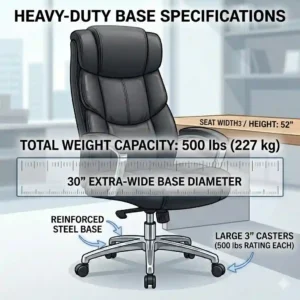
Manufacturers design gas cylinders and casters for specific weight classes. A 250lb user sitting in a chair rated for 200lbs won’t break it immediately, but the gas cylinder will lose its pneumatic seal within months, and the foam will permanently bottom out. Always buy a chair with a weight capacity at least 20% higher than your actual body weight to ensure longevity.
Misunderstanding “Lumbar Support”
A thick pillow at the bottom of the chair does not equal ergonomic design. True lumbar support must be height-adjustable. If the lumbar pad hits you in the buttocks or the mid-spine rather than the natural curve of your lower back, it will do more harm than good.
Leather vs. Mesh: The Ultimate Showdown
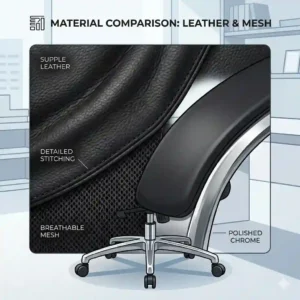
The debate between leather (or faux leather) and mesh defines the modern executive office chairs market. Rather than just comparing the look, let’s analyze the biological impact.
The Case for Mesh
Mesh materials, like the pellicle suspension found on high-end models, act like a hammock. They distribute weight evenly without creating localized pressure points. More importantly, mesh is thermally neutral. According to thermal imaging studies of office workers, skin temperatures on a leather chair can rise by 3 to 4 degrees over a few hours, leading to perspiration and discomfort. Mesh prevents this entirely.
The Case for Leather / Polyurethane
Leather, whether genuine or bonded, provides a distinctly different seating philosophy: padding. While mesh suspends you, foam-backed leather cradles you. This is highly beneficial for users with sciatica or those who lack natural gluteal padding, as the foam absorbs the direct impact of the sit bones. Additionally, leather is acoustically superior—mesh chairs often have plastic frames that creak when you shift, whereas a solid leather chair remains silent during microphone-sensitive zoom calls.
Expert Verdict: Choose mesh for task-heavy, 8-hour focus blocks in warmer climates. Choose leather for executive aesthetics, intermittent use, and acoustic silence in climate-controlled environments.
What to Expect: Real-World Performance Beyond the Spec Sheet
Manufacturers love listing specifications like “Class 4 Gas Lift” or “BIFMA Certified,” but they never translate what that means for your Tuesday afternoon.
When a spec sheet claims a chair features a Class 4 Gas Lift, it means the steel wall of the pneumatic cylinder is thick enough to handle the sudden dynamic shock of you dropping into the chair repeatedly. Cheaper Class 2 cylinders will slowly sink over time, meaning you’ll constantly have to reach for the lever to pull yourself back up to desk height.
When you see “Waterfall Edge Design,” don’t dismiss it as marketing jargon. A waterfall edge curves the front lip of the seat downward. In the real world, this prevents the hard plastic edge of the seat pan from acting like a tourniquet behind your knees. If your feet constantly fall asleep or you experience deep vein aching in your calves, you are suffering from a lack of a waterfall edge.
Lastly, “Tension Control.” It isn’t just about making it harder to lean back. Proper tension control acts as a counterbalance to your upper body weight. When dialed in correctly, you should be able to stop halfway through a recline and stay there without engaging your core muscles.
Features That Actually Matter (And Those That Don’t)
Let’s filter the marketing hype from the biomechanical necessities.
Features That Matter:
-
Seat Depth Adjustment (Seat Slider): If the seat pan is too long, you can’t reach the backrest. If it’s too short, your thighs are unsupported. A sliding seat pan is non-negotiable for high-end ergonomic health.
-
4D Armrests: Height, width, depth, and pivot. The ability to angle your armrests inward while typing on a compact keyboard saves your trapezius muscles from chronic tension.
-
Synchronized Tilt: As mentioned earlier, keeping your feet flat while reclining is vital for circulation.
Features That Don’t Matter:
-
Built-in Massage Motors: In my field tests, these are little more than vibrating cellphone motors shoved into cheap foam. They break quickly, require messy wires, and compromise the structural integrity of the backrest padding.
-
Extreme Recline (170+ degrees): Unless you are literally sleeping at your desk, a chair that reclines completely flat is structurally weaker and practically useless for deep work.
-
Excessive “Puffy” Padding: Over-stuffed pillows look comfortable but actually restrict micro-movements. Your body needs to shift slightly throughout the day; sinking deeply into a crevasse prevents natural weight redistribution.
Long-Term Cost & Maintenance: The Hidden TCO
Understanding the Total Cost of Ownership (TCO) completely changes the math on buying executive chairs.
Let’s compare a $150 big-box store chair to a $1,200 premium ergonomic model. The $150 chair utilizes low-density foam and a Class 2 cylinder. Within 18 months, the foam is flat, the chair sinks, and you are experiencing lower back pain. You replace it. Over a 10-year period, you will buy roughly six cheap chairs, spending $900, not accounting for the hidden costs of physical therapy or lost productivity due to back pain.
A $1,200 premium chair, backed by a 10-to-12-year warranty, relies on high-density molded foam or elastomer mesh. The TCO is exactly $100 per year.
To maximize this investment, implement a strict maintenance cycle:
-
Quarterly: Vacuum out the seat mechanics and caster wheels.
-
Bi-Annually: Re-torque all bolts with an Allen key. Metal fatigue and natural shifting will loosen the armrest and baseplate bolts over time.
-
Annually: Apply fabric/mesh cleaner or leather conditioner. Ultraviolet light from your office window will degrade unconditioned leather, causing micro-cracking within three years if ignored.
Ergonomic Regulations & Compliance Guide
For corporate buyers outfitting an entire office, or WFH employees applying for a home-office stipend, understanding regulatory standards is crucial.
When reviewing products, you will often see ANSI/BIFMA certification. BIFMA (The Business and Institutional Furniture Manufacturers Association) provides rigorous safety and performance standards. If an executive office chair is BIFMA certified, it means it has survived aggressive durability testing, such as having a heavy weight dropped on the seat 100,000 times, and the casters rolled over obstacles for miles without failing. You can verify standards and learn more about commercial furniture compliance at BIFMA’s official site.
Furthermore, the Occupational Safety and Health Administration (OSHA) offers strict guidelines on computer workstation setups. OSHA recommends that a chair must possess a 5-point base for stability (to prevent tipping when leaning out of the chair) and easily adjustable controls that can be operated from the seated position.
Lastly, research from institutions like the National Institutes of Health (NIH) highlights that prolonged static sitting without lumbar support correlates directly with musculoskeletal disorders. Choosing a chair that complies with these high-level biomechanical standards isn’t just about comfort; it’s about adhering to medically recognized health practices.
✨ Don’t Miss These Exclusive Deals!
🔍 Ready to transform your workspace? Click on any highlighted item to check current pricing and availability. Make the investment in your health and productivity today!
Conclusion: Making Your Final Decision
Upgrading your workspace seating is one of the highest ROI investments you can make for your physical health and daily productivity. Whether you opt for the highly tunable, engineering marvel of the Steelcase Gesture, or the plush, traditional authority of the La-Z-Boy Delano, the goal is the same: eliminating biological distractions so you can focus on your work.
Remember the expert framework: assess the seat pan density, demand synchronized tilt, and match the chair’s material to your room’s climate. Don’t fall for gaming chair aesthetics or useless massage features. Treat your executive office chair as a critical piece of hardware, maintain its mechanics bi-annually, and respect the 14-day break-in period. By making a mathematically sound, biomechanically appropriate choice, you aren’t just buying furniture—you are buying a better, pain-free workday.
FAQs
❓ What is the difference between an ergonomic chair and an executive office chair?
✅ Ergonomic chairs prioritize strict biomechanical adjustments (like 4D armrests and dynamic lumbar). Executive office chairs historically prioritize premium materials, larger frames, and commanding aesthetics, though modern 2026 models frequently blend both design philosophies into one unit…
❓ How long should a good executive chair last?
✅ A high-quality premium chair should last 7 to 12 years with daily use. Budget models (under $200) typically have a lifespan of 1 to 3 years before the foam compresses or the pneumatic cylinder begins to fail…
❓ Are mesh executive chairs better for your back than leather?
✅ Not inherently, but mesh is better for temperature regulation. Leather offers softer, more forgiving localized padding. Proper back support comes from the structure and adjustability of the lumbar system, regardless of the surface material used…
❓ How do I stop my office chair from sinking?
✅ Sinking is caused by a failed seal in the pneumatic gas cylinder. While temporary fixes like PVC pipe around the cylinder exist, the only permanent solution is purchasing a heavy-duty replacement cylinder and swapping it out…
❓ What is a BIFMA rating on executive office chairs?
✅ BIFMA is an industry standard that ensures commercial-grade durability. A BIFMA-rated chair has passed rigorous stress tests for weight capacity, caster roll durability, and structural integrity under constant, heavy, 24/7 usage…
Recommended for You
- 5 Ways to Design a modern executive board room with black chairs in 2026 for a More Elegant and Productive Workplace
- 10 Premium Leather Office Executive Chair Options for Professional Success in 2025
- 7 Best Luxury Executive Office Chair Models That Transform Your Workspace
Disclaimer: This article contains affiliate links. As an Amazon Associate, I earn from qualifying purchases. If you purchase products through these links, we may earn a small commission at no additional cost to you.
✨ Found this helpful? Share it with your friends! 💬🤗